
— LOCAL SEO GUIDE
Google Business Profile Optimization: The Ultimate Local Ranking Guide
By Webzenix Solutions · July 20, 2025 · 20 Min Read
In today’s digital-first world, appearing in local search results can make or break a business. And at the heart of local visibility lies one powerful tool — Google Business Profile Optimization. Whether you run a local shop, a service-based business, or a multi-location brand, optimizing your Google Business Profile (GBP) is essential to attract nearby customers, build trust, and outrank your competitors.
★★★★★ 4.8 (128)
Your Business Name
- Call
- Directions
- Save
- Website
📖 In This Guide, You'll Learn
- What is Google Business Profile?
- How to Use Posts, Photos & Reviews Effectively
- Why GBP Optimization is Crucial
- Common GBP Optimization Mistakes to Avoid
- Step-by-Step GBP Optimization Guide
- Measuring Success & Tracking Performance
- Advanced Optimization Strategies
- FAQs About Google Business Profile Optimization
— THE BASICS
What is Google Business Profile?
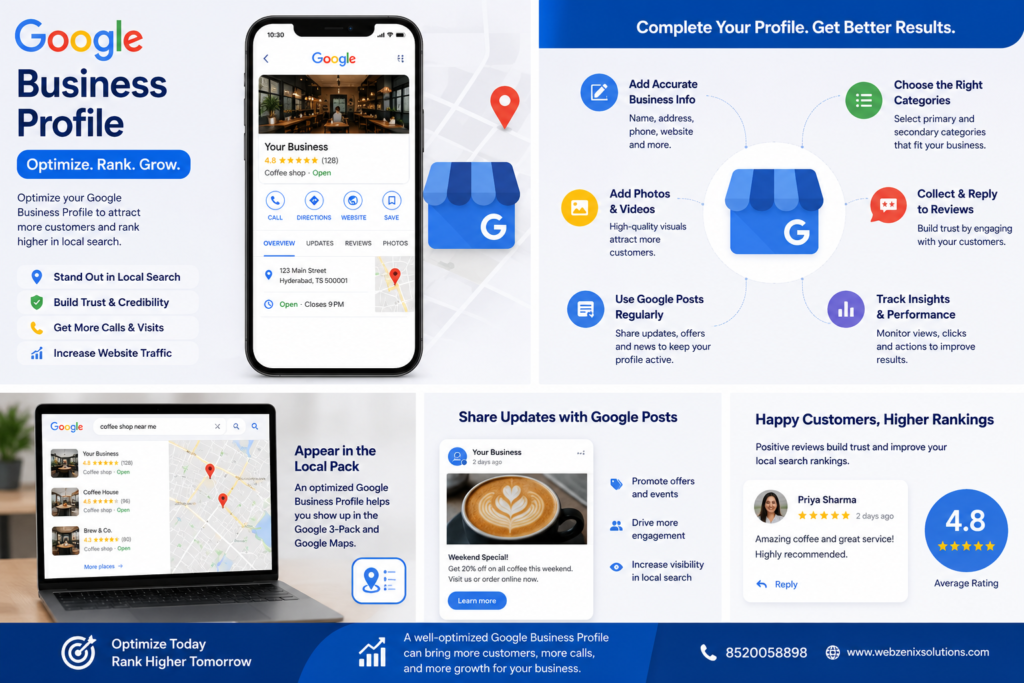
Google Business Profile (formerly Google My Business) is a free tool by Google that allows businesses to manage their online presence across Google Search and Google Maps. It displays essential information like your business name, address, phone number, website, hours, services, and customer reviews.
— WHY IT MATTERS
Why Google Business Profile Optimization is Crucial
Boosts Local Visibility
Appear in the Local Pack and Google Maps searches, increasing your chances of getting noticed.
Builds Trust & Credibility
Accurate information, photos, and positive reviews build customer trust.
More Leads & Conversions
Customers can call, message, or visit your website directly from your profile.
Better Than Competitors
Most businesses still don't fully optimize their profiles. You can outrank them easily.
— THE PLAYBOOK
Step-by-Step Google Business Profile Optimization Guide
Step 1
Claim & Verify Your Listing
Step 2
Complete Every Section
Step 3
Choose the Right Business Categories
Step 4
Write a Keyword-Rich Business Description
Step 5
Add High-Quality Photos & Videos
Step 6
Set Accurate Business Hours
Step 7
Add Services & Products
Step 8
Enable Messaging & Q&A
💡 Pro Tip
Consistency is key! Ensure your NAP (Name, Address, Phone Number) is consistent across all platforms.
— STAY ACTIVE
How to Use Posts, Photos & Reviews Effectively
Google Posts
Share updates, offers, events, and news regularly using Google Posts. It keeps your profile active and engages potential customers.
Photos & Videos
Add new photos regularly. Showcase your store, team, happy customers, and behind-the-scenes moments.
Customer Reviews
Encourage happy customers to leave reviews. Respond to all reviews — positive and negative — to build trust.
Common GBP Optimization Mistakes to Avoid
- Incomplete or inaccurate business information
- Using the wrong business categories
- Not adding photos or using low-quality images
- Ignoring customer reviews
- Inconsistent NAP details across directories
Measuring Success & Tracking Performance
- Search views
- Website clicks
- Phone calls
- Direction requests
- Customer actions (bookings, messages, etc.)
Ready to Dominate Local Search?
- 📞 8520058898
- 🌐 www.webzenixsolutions.com